Using Virtuoso's WebID Identity Provider (IdP) Proxy Service with an X.509 certificate bearing an LDAP scheme WebID
What?
A callback supporting service that enables third parties verify WebIDs via RESTful interaction patterns.Why?
Most Web Developers and Users prefer to do plumbing as opposed to wholesale development in the course of web exploitation. Thus, federated services to which responsibilities can be delegated are always beneficial.How?
This verification service offers a user-friendly alternative to manually querying SPARQL endpoints; i.e., checking whether a WebID and Public Key are related within a profile graph.
The service currently supports WebIDs based on the ldap:, http:, mailto:, acct: URI schemes.
Other URI schemes will be added over time.
Example Using the Service Endpoint
Prerequisites
If you want to use your own Virtuoso instance for this exercise, please ensure the following steps are performed:
- Start Virtuoso server instance (locally, remote, EC2 AMI, etc. );
- Configure an HTTPS Listener for handling HTTPS requests from HTTP user agents (clients);
- Install the ODS Framework VAD package;
- Install the HTML based Certificate Generator VAD package;
- Create an X.509 Certificate with WebID watermark. Otherwise, simply use the live certificate generation service at: http://id.myopenlink.net/certgen/.
Steps
- Access the service endpoint:
https://<Virtuoso host or IP address>[:<ssl-port>]/ods/webid_check.vsp, e.g., https://id.myopenlink.net:443/ods/webid_check.vsp - The browser should prompt for identification.
Select the certificate generated above, and click "OK".
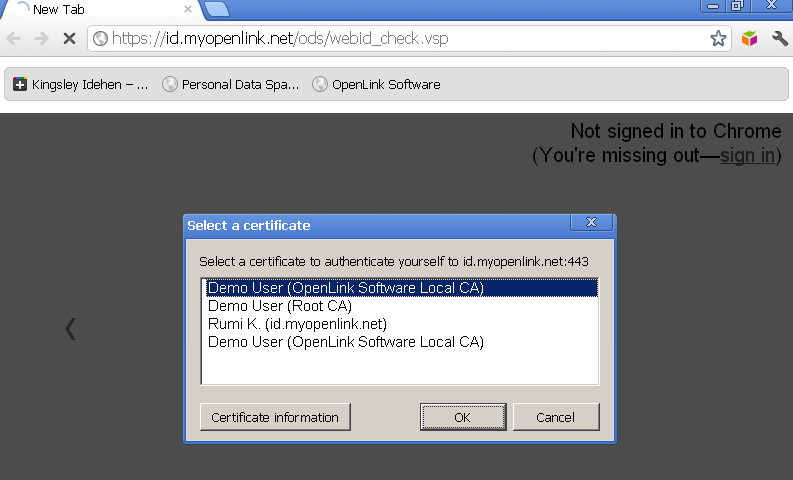
- The WebID Identity Provider UI should be presented:
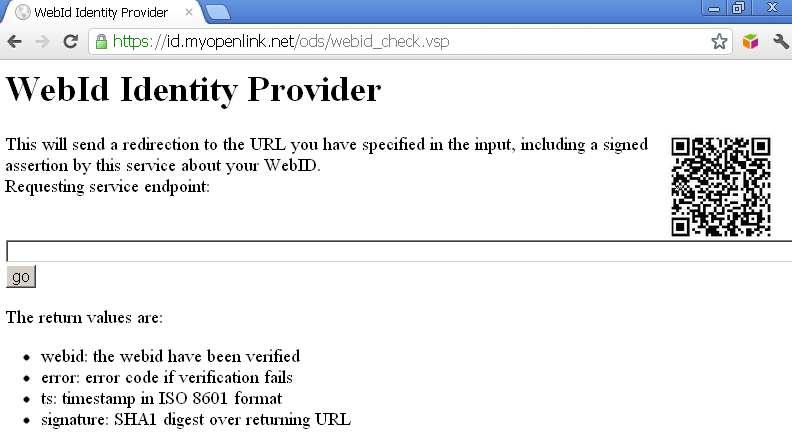
- Enter a Requesting service endpoint, for example:
https://id.myopenlink.net/ods/
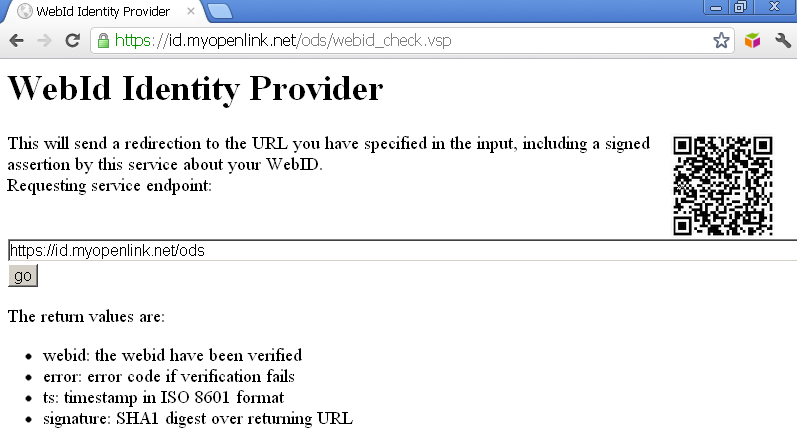
- Click "Go".
- When prompted for verification, again the certificate generated above and click "OK":
- You should now be redirected to a log in page which has recognized the certificate's WebID, and a "WebID Login" should be offered:
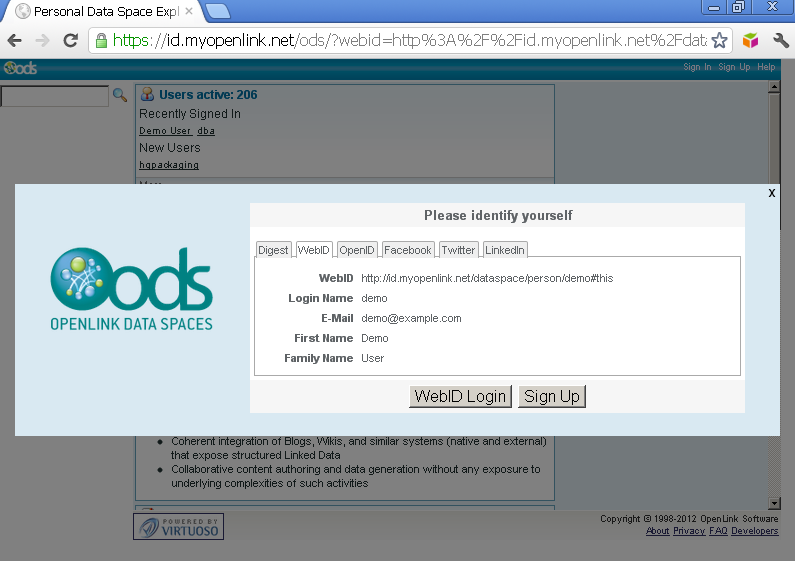
- Click the "WebID Login" button.
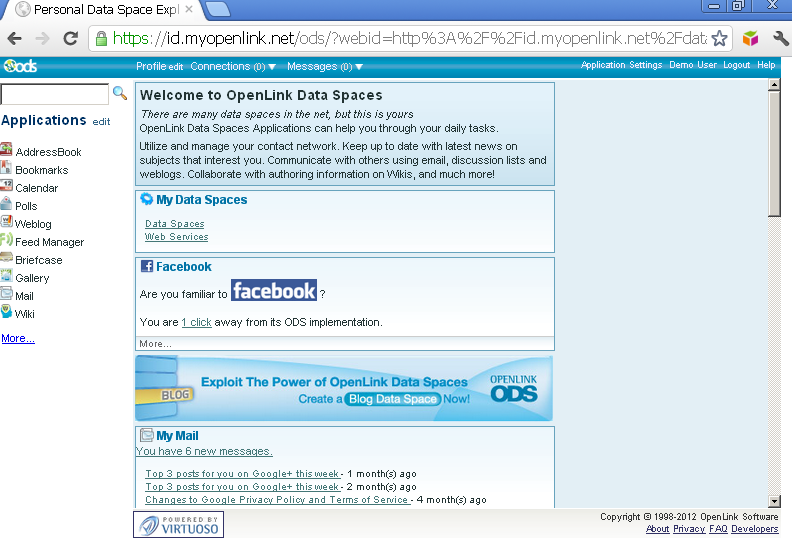
- You should now be successfully logged in:
Examples Using cURL
Prerequisites
Using Your Own Virtuoso Instance
If you want to use your own Virtuoso instance for this exercise, please ensure the following steps are performed:
- Start Virtuoso server instance (locally, remote, EC2 AMI, etc. );
- Configure an HTTPS Listener for handling HTTPS requests from HTTP user agents (clients);
- Install the ODS Framework VAD package;
- Install the HTML based Certificate Generator VAD package;
- Create an X.509 Certificate with WebID watermark. Otherwise, simply use the live certificate generation service at: http://id.myopenlink.net/certgen/.
- Using the service at: http://id.myopenlink.net/certgen/, export the generated X.509 Certificate and its associated private key to a local PKCS#12 (.p12 of .pfx) file system e.g., the file: "demo.p12" and password: "test"; or simply export to a PEM file.
- Alternatively, you can achieve the same using OpenSSL utilities by executing the following from the command line:
openssl pkcs12 -in demo.p12 -out demo.pem -nodes
Using A Live Instance
If don't already have an X.509 certificate with a WebID watermark, simply use the live certificate generation service at: http://id.myopenlink.net/certgen/ . You can also use this service to export your certificate in PEM and other formats.
Example 1: Call the Service with Certificate
- Execute the following command:
$ curl -i -k --cert demo.pem  https://id.myopenlink.net/ods/webid_check.vsp?callback=http://id.myopenlink.net/myapp/
Enter PEM pass phrase:
HTTP/1.1 302 Found
Server: Virtuoso/06.03.3131 (Linux) x86_64-generic-linux-glibc25-64  VDB
Connection: Keep-Alive
Content-Type: text/html; charset=UTF-8
Date: Thu, 05 Jan 2012 16:08:13 GMT
Accept-Ranges: bytes
Location: http://id.myopenlink.net/myapp/?webid=http%3A%2F%2Fid.myopenlink.net%2Fdataspace%2Fperson%2Fdemo%23this&ts=2012-01-05T11%3A08%3A13.000004-05
%3A00&signature=a17coYTjgrPnz%2FmEi9OVRwiTEa8%3D
Content-Length: 0
- In case of successful WebID verification, the WebID should be returned, as above:
webid=http%3A%2F%2Fid.myopenlink.net%2Fdataspace%2Fperson%2Fdemo%23this
- Additionally a timestamp in ISO 8601 format should be returned, as above:
ts=2012-01-05T11%3A08%3A13.000004-05
Example 2: Call the Service without Certificate
- Execute the following command:
$ curl -i -k   https://id.myopenlink.net/ods/webid_check.vsp?callback=http://id.myopenlink.net/myapp/
HTTP/1.1 302 Found
Server: Virtuoso/06.03.3131 (Linux) x86_64-generic-linux-glibc25-64  VDB
Connection: Keep-Alive
Content-Type: text/html; charset=UTF-8
Date: Thu, 05 Jan 2012 15:02:16 GMT
Accept-Ranges: bytes
Location: http://id.myopenlink.net/myapp/?error=noCert&ts=2012-01-05T10%3A02%3A16-05%3A00&signature=TLNskapgUg75%2FzJSRe154RloH%2FE%3D
Content-Length: 0
- The service returns "
error=.." as it is in our example showing there is no certificate:
error=noCert
Related
- Using Virtuoso's Delegated WebID Verification Service
- Safeguarding your Virtuoso-hosted SPARQL Endpoint
- SPARQL Endpoint Protection Methods Collection
- Virtuoso documentation
- Virtuoso Tips and Tricks Collection
- SPARUL over SPARQL using the http://cname:port/sparql-auth endpoint
- Virtuoso Authentication Server UI
- Manage a SPARQL-WebID based Endpoint
- WebID Protocol Support in OpenLink Data Spaces.
- Manage ODS Datadspaces Objects WebID Access Control Lists (ACLs):
- Guide for Set up a X.509 certificate issuer and HTTPS listener and generate ODS user certificates
- Configure Virtuoso+ODS instance as an X.509 Certificate Authority and HTTPS listener
- Configure Virtuoso instance as an X.509 Certificate Authority and HTTPS listener
- Setting up PubSubHub in ODS
- PubSubHubBub Demo Client Example
- Feed subscription via PubSubHub protocol Example
- Setting Up PubSubHub to use WebID Protocol or IP based control lists
- CA Keys Import using Conductor
- Generate an X.509 Certificate hosted WebID Guide
- Generate an X.509 Certificate (with a WebID watermark) to be managed by host operating system keystore
- Generate an X.509 Certificate (with a WebID watermark) to be managed by a browser-based keystore
- ODS Briefcase WebID Protocol Share File Guide
- WebID Protocol Specification
- Test WebID Protocol Certificate page
- WebID Protocol Certificate Generation page